CHANGELOG
All notable user-facing changes to Scout are documented in this file (Effective September 2025).
2025-09-04
Two-way sync between Scout Folders and JobAdder
- Introduced two-way folder sync between Scout and JobAdder: folders on JobAdder are now synced with Scout Folders.
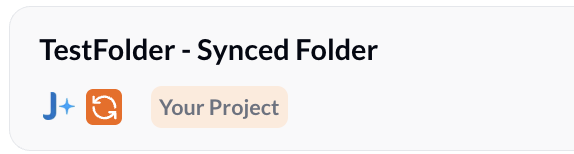
- When you add someone to a Scout project, they are automatically added to the corresponding folder on JobAdder and will be pushed to the ATS if they are not already present there.
- When you add someone directly to the folder on the ATS (JobAdder), they will be pulled into Scout and added to the matching project.
- Sync runs on a 20-minute polling interval.
- Note: This feature is currently supported on JobAdder.
Sample Use Case
You are hiring for OSCP Cybersecurity Engineers and want to reach out to potential candidates.
-
Setup: You have a folder in JobAdder named “Cybersecurity OSCP engineers” which gets automatically synced to Scout as a project.
-
Source from LinkedIn: While browsing LinkedIn, add promising candidates directly into the Scout project — they will be added to the matching JobAdder folder and pushed to the ATS if not already present.
-
Search in Scout: Run the job role as a search in Scout (https://app.getscout.ai/search/new), review results, and add relevant people to the project.
-
Outreach: With candidates in the Scout project, start an email or LinkedIn sequence from Scout to reach out and gauge interest.
-
Result: Membership and candidate records stay synchronized between Scout and JobAdder (20-minute polling), reducing manual work and keeping the ATS up to date.
2025-09-02
Enhanced Scout Chrome Extension experience
- Scout Chrome Extension is now much faster with a refreshed, faster UI
- Download the Chrome Extension here - https://chromewebstore.google.com/detail/scout/pjionnbbplmnahhdcfgacfoejbimajgb
Open to Work tag in Candidate Recommendations email
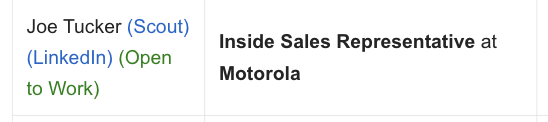
- Additional Open to Work tag in Candidate Recommendations email if the user has recently indicated that they are open to work on LinkedIn
- Please whitelist
noreply@getscout.aiin your mailbox to receive recommendations in your mailbox as soon as you upload them to your ATS. - Note: This feature is supported in Vincere and JobAdder.
2026-03-13
Drag-and-Drop Resume Upload (Jobs & Projects)
A drag-and-drop capability has been added to the Job Board to simplify candidate uploads.
Details
- Users can drag and drop a candidate’s resume directly into any folder within the Job Board.
- The system will process the resume and automatically create the candidate entry.
- The candidate will appear in the selected folder after approximately 20 seconds.
2026-03-14
Placement Submission Package
Instantly generates a polished candidate summary and saves it as a pre-formatted draft directly in your connected email mailbox
Details
- Select “Generate Placement Submission Package” from any candidate card to automatically pull key profile data.
- Edit details like notice period, visa status, and expected salary on the fly before generating.
- Once generated, Scout automatically creates a formatted draft in your connected mailbox, complete with a professional subject line and a structured “Candidate Summary” body.
- If you need to make a change, simply edit the details in Scout and click “Regenerate” to update your email draft instantly.
2026-03-30
Candidate Interview Scheduler
Simplify interview coordination by allowing recruiters and hiring managers to manage scheduling interview directly from Scout.
Details
- Recruiters and hiring managers can now set available time slots and send interview invitations to any candidate within Scout platform.
- Candidates can choose from the provided slots or suggest alternative time slot, streamlining the back-and-forth of scheduling.
- A virtual meeting (Microsoft Teams, Google Meet, etc) is automatically generated and synced once the candidate confirms their preferred time.
- Note: This feature requires an active connection to your email client. Please ensure your mailbox is linked and the feature is enabled in your settings before use.