New Search
The New Search feature is Scout’s AI-powered candidate sourcing engine. Instead of writing complex Boolean search strings, you can find the most qualified candidates in your database by simply providing a job description. Scout’s AI parses the requirements and recommends matching profiles instantly.
How to Start a New Search
Finding top-tier talent is a simple three-step process:
STEP 1: Input the Job Description
In the search input field, provide your job requirements using one of three convenient methods:
- Paste Full Text: Copy and paste the complete text of your job description directly.
- Upload Document: Upload a job description file (such as a PDF or Word document).
- LinkedIn Job URL: Enter the web address of a live LinkedIn job posting.
STEP 2: Refine Your Search Parameters
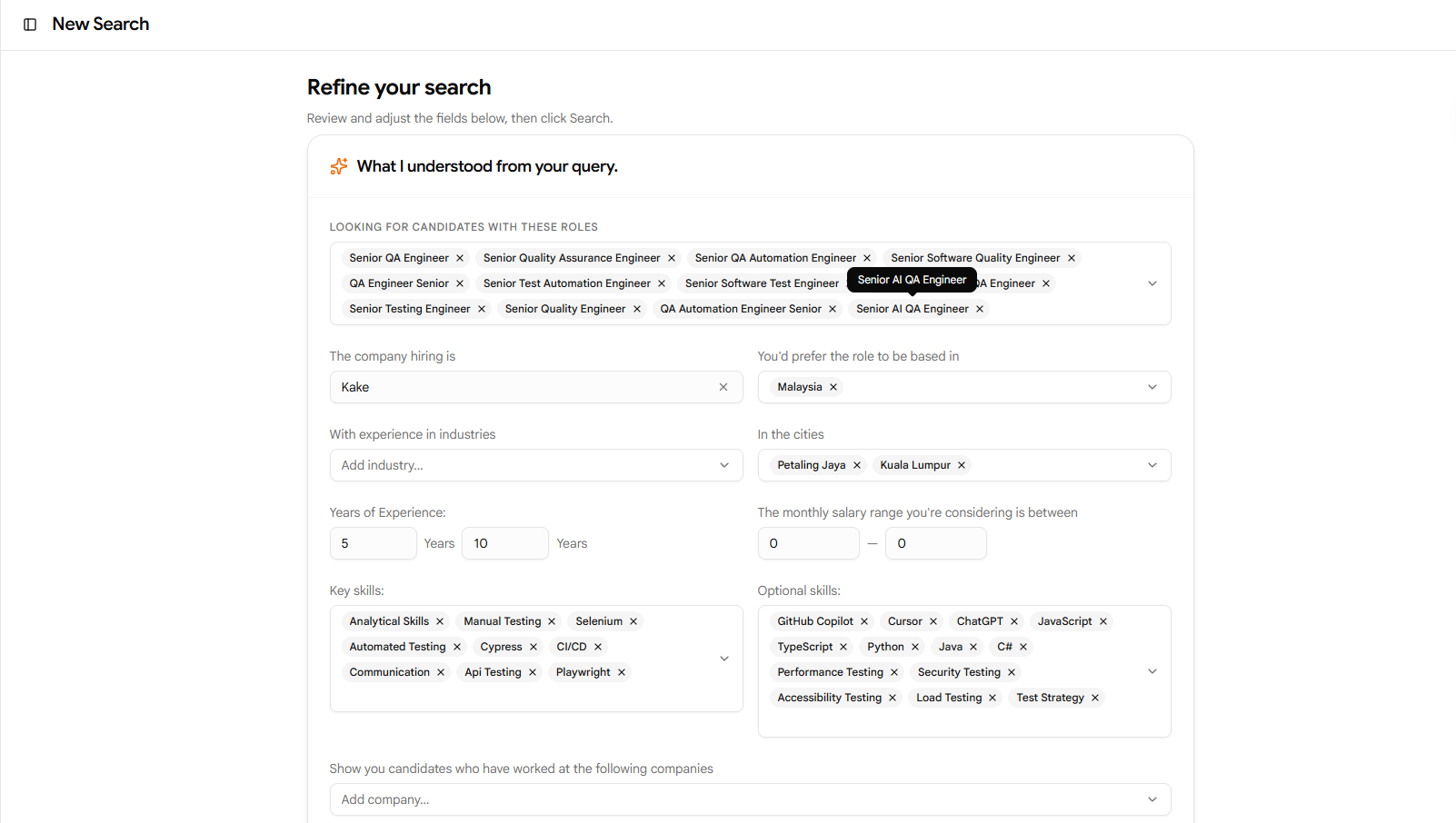
Once your job description is entered, Scout’s AI co-pilot automatically extracts key criteria and generates structured search fields for your review. Fine-tune these parameters to narrow or expand your results:
- Target Roles & Titles: Confirm the job titles you want to match.
- Target/Excluded Companies: Include specific companies to source from, or exclude competitors.
- Location: Define geographic requirements or specify remote-friendly preferences.
- Years of Experience (YoE): Set minimum and maximum experience levels.
- Salary Range: Specify budget parameters.
- Required Skills: Review the skills extracted by the AI. You can mark critical skills as Mandatory to filter out candidates who do not possess them.
STEP 3: View Matched Candidates
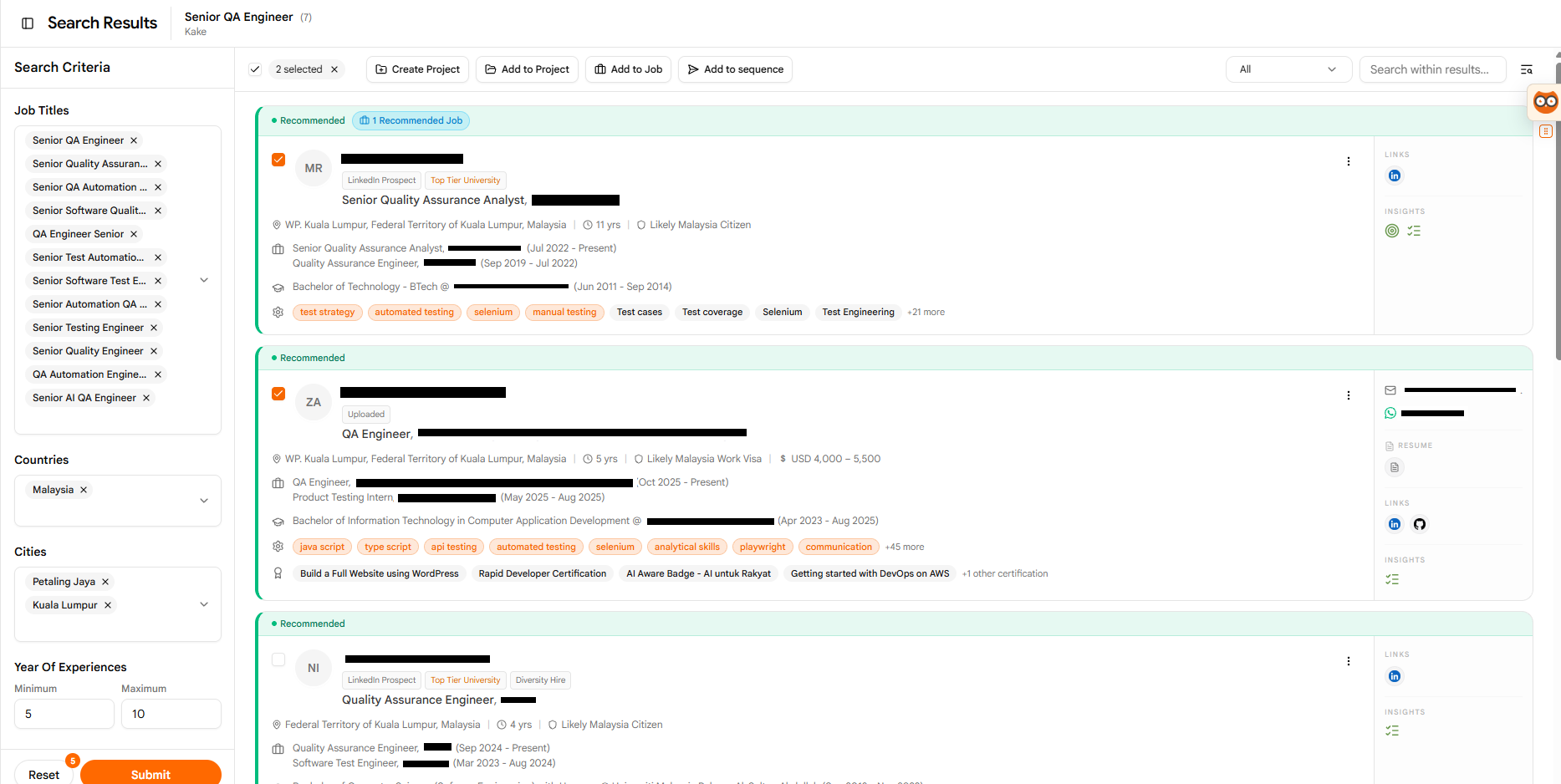
Click Submit to run the search. Scout will scan your synced database and display a list of matched candidates, ranked by how well their profiles align with your criteria.
Managing Matched Candidates
Once you have identified the right candidates, you can perform bulk or individual actions directly from the results list. First, check the box next to one or more candidates, and then select one of the actions below:
CREATE a New Project
Group your matched candidates into a dedicated folder for a specific hiring drive.
- Select your target candidates by checking the boxes next to their names.
- Click the Create Project button in the action bar at the top of the list.
- Complete the details in the Create Project dialog and save.
ADD to an Existing Project
Keep your pipeline organized by adding candidates to active sourcing projects.
- Select your target candidates.
- Click Add to Project in the action bar.
- Select one or more of your existing projects from the dropdown list and confirm.
LINK to a Job
Associate candidates directly with open roles synced from your Applicant Tracking System (ATS).
- Select your target candidates.
- Click Add to Job in the action bar.
- Search for and select one or more jobs to associate the candidates with.
ENROLL in Outreach Sequences
Initiate automated, multi-touch campaigns to engage candidates and gauge their interest.
- Select your target candidates.
- Click Add to Sequence in the action bar.
- Select your preferred communication channel: Email Sequence or LinkedIn Sequence.
- Choose to Create new sequence or select an Existing sequence.
- Confirm the enrollment to start your outreach campaign.
Pro Sourcing Tip
If you are getting too few results, try relaxing some of your filters. Marking fewer skills as Mandatory or expanding the Years of Experience range can help surface highly qualified adjacent talent that you can nurture.