Resume Upload
The Resume Upload feature allows you to source candidates by uploading a resume file. Scout will parse the resume and extract relevant information to match with potential candidates in the database.
UPLOADING Candidate Resumes
You can quickly source candidates by uploading their resume files. Scout automatically parses PDF and DOCX files to extract experience, skills, and contact details.
- Drag and drop your PDF or DOCX resume file(s) directly into the upload area, or click to select files from your computer.
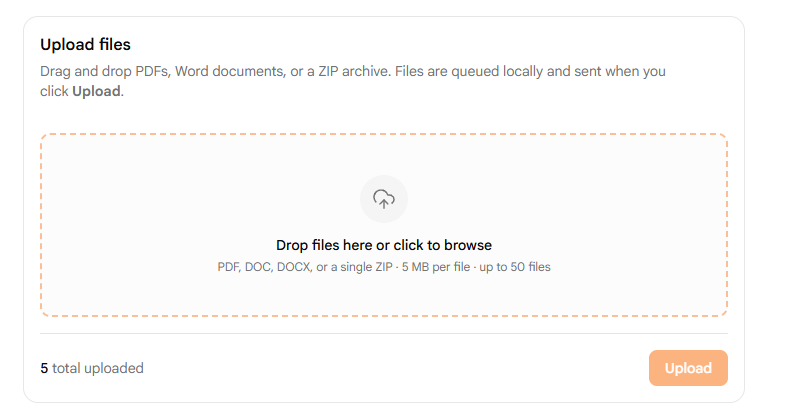
- Wait a few moments while the system processes and parses the resumes.
- Once processing is complete, the candidates will appear in the Recent Uploads table.
VIEWING Profiles from Recent Uploads
Once a resume is parsed, you can review the candidate’s complete profile:
- Locate the candidate in the Recent Uploads table and click the View Profile link in their row.
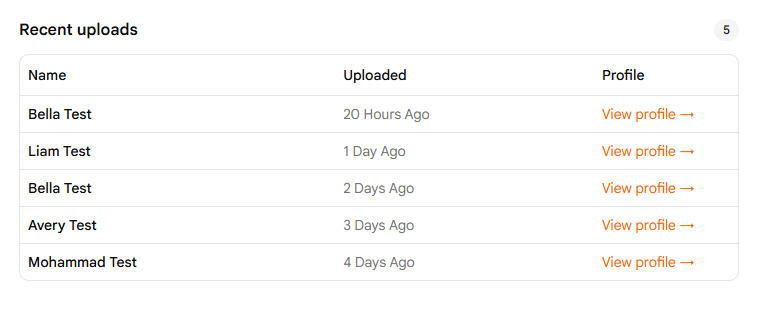
- The candidate’s full profile will open automatically in a new browser tab.
Pro Sourcing Tip
You can select and upload up to 50 resumes simultaneously to bulk-import candidates and speed up your sourcing workflow.