CHANGELOG
All notable user-facing changes to Scout are documented in this file (Effective September 2025).
2025-09-04
Two-way sync between Scout Folders and JobAdder
- Introduced two-way folder sync between Scout and JobAdder: folders on JobAdder are now synced with Scout Folders.
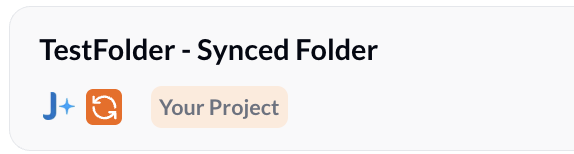
- When you add someone to a Scout project, they are automatically added to the corresponding folder on JobAdder and will be pushed to the ATS if they are not already present there.
- When you add someone directly to the folder on the ATS (JobAdder), they will be pulled into Scout and added to the matching project.
- Sync runs on a 20-minute polling interval.
- Note: This feature is currently supported on JobAdder.
Sample Use Case
You are hiring for OSCP Cybersecurity Engineers and want to reach out to potential candidates.
-
Setup: You have a folder in JobAdder named “Cybersecurity OSCP engineers” which gets automatically synced to Scout as a project.
-
Source from LinkedIn: While browsing LinkedIn, add promising candidates directly into the Scout project — they will be added to the matching JobAdder folder and pushed to the ATS if not already present.
-
Search in Scout: Run the job role as a search in Scout (https://app.getscout.ai/search/new), review results, and add relevant people to the project.
-
Outreach: With candidates in the Scout project, start an email or LinkedIn sequence from Scout to reach out and gauge interest.
-
Result: Membership and candidate records stay synchronized between Scout and JobAdder (20-minute polling), reducing manual work and keeping the ATS up to date.
2025-09-02
Scout - Enhanced Scout Chrome Extension experience
- Scout Chrome Extension is now much faster with a refreshed, faster UI
- Download the Chrome Extension here - https://chromewebstore.google.com/detail/scout/pjionnbbplmnahhdcfgacfoejbimajgb
Scout - Open to Work tag in Candidate Recommendations email
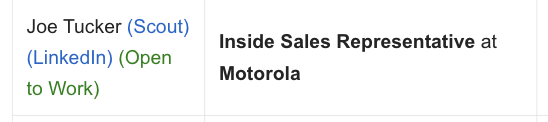
- Additional Open to Work tag in Candidate Recommendations email if the user has recently indicated that they are open to work on LinkedIn
- Please whitelist
noreply@getscout.aiin your mailbox to receive recommendations in your mailbox as soon as you upload them to your ATS. - Note: This feature is supported in Vincere and JobAdder.
2026-03-13
Scout - Drag-and-Drop Resume Upload (Jobs & Projects)
A drag-and-drop capability has been added to the Job Board to simplify candidate uploads.
Details
- Users can drag and drop a candidate’s resume directly into any folder within the Job Board.
- The system will process the resume and automatically create the candidate entry.
- The candidate will appear in the selected folder after approximately 20 seconds.
2026-03-14
Scout - Placement Submission Package
Instantly generates a polished candidate summary and saves it as a pre-formatted draft directly in your connected email mailbox
Details
- Select “Generate Placement Submission Package” from any candidate card to automatically pull key profile data.
- Edit details like notice period, visa status, and expected salary on the fly before generating.
- Once generated, Scout automatically creates a formatted draft in your connected mailbox, complete with a professional subject line and a structured “Candidate Summary” body.
- If you need to make a change, simply edit the details in Scout and click “Regenerate” to update your email draft instantly.
2026-03-30
Scout - Candidate Interview Scheduler
Simplify interview coordination by allowing recruiters and hiring managers to manage scheduling interview directly from Scout.
Details
- Recruiters and hiring managers can now set available time slots and send interview invitations to any candidate within Scout platform.
- Candidates can choose from the provided slots or suggest alternative time slot, streamlining the back-and-forth of scheduling.
- A virtual meeting (Microsoft Teams, Google Meet, etc) is automatically generated and synced once the candidate confirms their preferred time.
- Note: This feature requires an active connection to your email client. Please ensure your mailbox is linked and the feature is enabled in your settings before use.
2026-04-20
Scout Select - AI Interview Tool
Scout Select is an AI-powered interview platform designed to automate and standardize technical and behavioral assessments. It utilizes low-latency avatars to conduct real-time voice interviews, providing hiring teams with structured evidence, skill-based scoring, and detailed candidate reports to accelerate hiring decisions.
With features:
- AI-Driven Voice Interviews: Conducts natural, real-time interviews using avatars with multi-language support and low-latency responses.
- Dynamic Follow-up Questions: Listens to candidate answers and asks targeted follow-ups to verify depth of knowledge and prevent rehearsed responses.
- Adaptive Difficulty: Live adjustment of question difficulty (from entry-level to senior tracks) based on candidate performance during the session.
- Role-Specific Technical Assessments: Includes built-in environments for live coding (20+ languages), SQL tasks, financial modeling, and system architecture boards.
- Automated Scoring & Rubrics: Evaluates candidates against role-specific criteria and consistent rubrics, delivering competency scores and hiring rationale.
- Comprehensive Reporting: Provides full transcripts, voice analysis (confidence, stress, and authenticity signals), and “Skill Snapshots” immediately after interviews.
2026-04-22
Scout - Enhanced Job Management & AI-Powered Precision
Streamline Scout’s job management workflow with direct source access and take full control of your recruitment content with AI-enhanced job description optimization.
What’s New?
- Direct Access to Source Links: Navigating between Scout and original job postings just got faster. We’ve added a new external link icon to your Jobs page and individual job details. If a job was created via an external link, one click will now take you directly back to the original source—keeping your workflow seamless and your data verified.
- Enhanced AI Writing Control: User now have full authority over how Job Descriptions (JD) are crafted. We’ve introduced a “Rewrite JD with AI” toggle during the job creation process.
- Keep it Raw (Default): With the toggle OFF, Scout will pull the description and requirements exactly as they appear in the JD, applying only light formatting for readability.
- Optimize with AI: Flip the switch ON to trigger Scout’s AI engine. It will intelligently rewrite and enhance the job details, ensuring they are polished, professional, and optimized to attract top-tier talent.
2026-04-23
Scout Select - Interview’s Decision, Notes & Custom Fields
Empower your hiring team with deeper evaluation tools—standardize interview outcomes, maintain centralized candidate notes, and tailor your data views with flexible custom fields.
What’s New?
- Standardized Interview Decisions: Easily categorize candidate performance with clear ratings—Unsatisfactory, Meets Expectations, or Exceeds Expectations to ensure consistent evaluation across your team.
- Centralized Candidate Notes: Keep all candidate insights in one place. Add detailed notes to any profile; final interview decisions are automatically logged within the notes for a complete audit trail between recruiters and contributors of the interview.
- Tailored Custom Fields: Admins can now define and display custom data fields directly in the candidate table, allowing your organization to highlight the specific information that matters most to your workflow.
2026-04-28
Scout - Candidate AI Voice Note
Capture candidate insights on the go with hands-free voice recording and automated AI transcription.
What’s New?
- AI-Powered Voice Notes: You can now add new notes to a candidate’s profile using your voice. Perfect for capturing quick thoughts or debriefs immediately after a conversation.
- Automated Formatting: Once you finish recording, Scout’s AI intelligently processes the audio to generate a structured, formatted summary. This processed result is automatically saved to the candidate’s list of notes, ensuring your feedback is organized and searchable
2026-05-04
Scout Select - Dynamic Assessment Versioning & Iteration
Iterate on your interview process without disruption by editing active assessments and managing candidate versions seamlessly.
What’s New?
- Seamless Edits: You can now refine and edit your interviews even after they’ve been launched. Scout Select automatically manages versioning (v1, v2, etc.), keeping your assessment history organized and traceable.
- Instant Updates: Maintain evaluation consistency across batches. Candidates added after an edit will automatically receive the latest version, while those previously invited will continue with the version they were originally assigned. This ensures a fair and stable experience for every applicant
2026-05-05
Scout Select - AI Plagiarism Detection & Response Integrity
Strengthen interview authenticity with advanced AI detection tools and session monitoring.
What’s New?
- Detecting the use of AI: A new indicator will now appear in reports when a candidate’s responses show patterns consistent with AI assistance. This includes potential copy-paste actions, signs of AI-assisted typing behaviour, and AI assistance used while solving attachment-based tasks, helping verify the authenticity of every evaluation.
- Window Focus Monitoring: To further ensure assessment fairness, the system now detects and logs when a candidate switches to other browser tabs or windows during an active interview session.
- Camera-Based Attention Monitoring: If the camera feature is turned on, Scout SELECT can monitor whether the candidate’s attention appears to be on the screen or elsewhere during the interview.
- Screen Recording: Switch the Screen Sharing flag on to ensure the candidate shares their entire screen while delivering the interview.
2026-05-11
Scout Select - Developers API
Seamlessly integrate Scout Select into your existing recruitment stack with our new Developers API, providing programmatic access to candidate management and interview tools.
What’s New?
- Developer API Key Management: Create and manage unique API keys to securely connect your internal systems with Scout Select.
- Interactive API Test Console: Experiment with API endpoints directly in the browser using a built-in test console to verify your requests and responses.
- Extended Functionality: Integrate core Scout Select features into your own applications. Users can now programmatically:
- Search for candidates and assessments.
- Create new candidate records.
- Assign interviews to candidates.
2026-05-14
Scout - Company Watchlist
Track jobs jobs by companies to supercharge your Business Development on Scout and reach clients and/or prosects who have open roles.
What’s New?
- Company Job Tracking: Configure your Watchlist on Scout and it will automatically monitor when your target companies (including existing clients and/or new prosects) post new job vacancies on their LinkedIn and their career pages.
- Smart Recommendations Email: Scout sends you email notifications when a watched company posts a job, and gives you a direct link to recommended candidates tailored for the role
- One-Click Job Integration: You can also post those tracked jobs seamlessly to your Scout job board with a single click. By the way, did you know you could host all your open jobs on Scout at jobs.
.com?
2026-06-29
Scout - WhatsApp Integration
Manage your recruitment workflow directly through WhatsApp, bringing Scout’s powerful features to your favorite messaging app. Introducing Scout WhatsApp AI.
What’s New?
- Seamless WhatsApp Integration: To get started, users need to enable the WhatsApp integration from the Scout platform. Once active, you can:
- Create Profiles: Forward or upload a resume directly to create a candidate profile.
- Job & Project Setup: Upload a Job Description to get recommendations or create a new project.
- Pipeline Management: Add profiles to your project pipelines on the go.
- Voice Notes: Quickly add voice notes to candidate profiles.
- Candidate Search: Search for candidate details directly within your WhatsApp chat
2026-07-01
Scout - New BD Functionality
Streamline your business development workflow by managing clients independently, tracking conversions on a dedicated dashboard, and attributing candidate submissions to specific clients.
What’s New?
- Separate Employer and Contact Management: Employers and contacts can now be stored and managed independently, providing a more flexible CRM structure.
- All-New BD Dashboard: Track your engagements, BD conversions, and candidate submissions from an upgraded, BD-specific dashboard at https://app.getscout.ai/bd/dashboard.
- Candidate Submission Attribution: When generating candidate reports or white-labeled resumes, Scout will now prompt you to specify if you are submitting them to a client. This helps automatically track client conversions and build a clear BD history for each client or prospect
2026-07-13
Scout - Profile Enrichment
Enrich candidate profiles with up-to-date contact, experience, and skill information automatically sourced from online channels.
What’s New?
- Free Monthly Enrichment Credits: Every organization receives 25 free enrichment credits per month to gather experience, contact, and skill details from online sources.
- Apollo.io Integration: Integrate your own Apollo account to use your own Apollo credits directly within Scout.